 With the official launch of Windows 7 currently underway around the globe, Microsoft has released four new advertisements to market Windows 7. This round of advertisements is very simplistic and dubbed "7 Second Demos". Check them out below and let us know what you think.
Thursday, October 22, 2009

 Right now, it's October 22nd in some parts of the world, and Microsoft has begun releasing Windows 7 across the world at various launch parties and events. In New Zealand, Microsoft held events in Auckland and Wellington to promote the launch of Windows 7 by gathering a crowd and making a big Windows 7 logo with them.
Windows 7, is available worldwide today to the general public, whereas before now it has only been available to technet/msdn subscribers, as well as VLK owners and university students around the globe. Windows 7 had the largest beta testing process in the history of Windows release cycles, with well over 8 million copies of the public beta being downloaded in 3 months.
In May, Microsoft made the Release Candidate, Build "7100", available to the public through until August 20, stating that this version of Windows 7 would be free for "six months" if you continued to use the RC until it expired. This build had over 100 fixes and tweaks that Microsoft had provided thanks to testers feedback. On August 6, Microsoft made available the RTM code, Build "7600", of Windows 7 to Technet/MSDN users, and general availabilty on October 22 marks the final phase of Windows 7's release - after 3 years of development and testing, which was heavily user driven.
From today, Windows 7 will be available from retailers around the world, as well as online stores such as Amazon.


So, Neowin, have you got your copy yet? Hot off the press? Or have you had it for a while?
Update: Microsoft NZ has made available a Photosynth of the events in New Zealand on their promotional website.
Update #2: Microsoft showed a promotional video at the launch event earlier today in the United Kingdom that counts up the releases of Windows. Notice that they omitted Windows ME. Thanks Long Zheng!
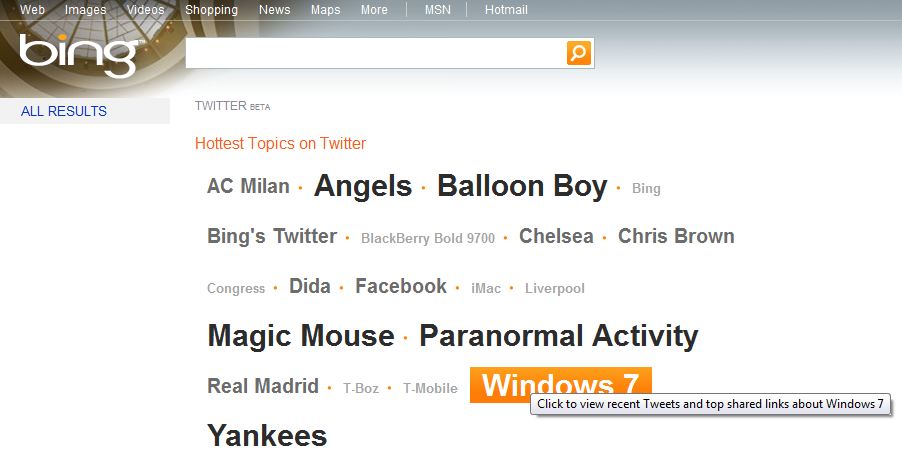
Update #3: Microsoft is offering real-time Windows 7 tweets via a update that just went live to the Windows site.
Neowin Hands on: Sky Player in Windows 7 Media Center
 Microsoft today held a UK launch party for Windows 7 and announced a major partnership with Sky.
Sky Player, Sky's online TV service, will be available to Windows Media Center users in Windows 7. Sky previously announced the same service will be available on Xbox 360 later this month but have now confirmed this will now be available to Windows 7 Media Center users too.
The service will allow users access to Live TV, on demand content, movies and sport. Existing Sky TV customers will be able to purchase an online Sky Player multiroom subscription for £5 per month. Customers with Sky Multiroom or Sky Broadband Unlimited will be able to access live channels for no extra charge. Non-Sky TV customers will require a monthly subscription that starts at £15 per month to the Base Entertainment Pack. In addition to the live channels, customers will also have access to on-demand programmes from channels they subscribe to.
Neowin got an early hands on with the addin for Windows Media Center and although it's beta and has some bugs, it's an impressive way to watch Sky content on a Media Center PC. We asked a Microsoft rep to take us through some of the features and you can see the hands on below.
Microsoft gets search deal with Facebook and Twitter
 Microsoft announced on Wednesday at the Web 2.0 Summit, that it has signed deals with Twitter allowing real time updates in Bing. These real-time updates will bring tweets directly onto bing.com/twitter. Facebook is also said to have real-time updates in the near future, but plans for that are still in development.
The Bing Twitter beta will allow these public updates to be published directly onto the search engine, allowing for anybody to search Twitter directly from Bing. Twitter feeds that include spam, duplicate results, and adult content will be filtered out of the news stream.
The Twitter deal also features a search query that lists tweets in chronological order. The Bing Twitter search also offers "Best Match", which will use Bing's very own search technology to display results.
Both Facebook, which Microsoft has financial investment in, and Twitter have also been rumored to be talking with Google about similar deals. Microsoft and Twitter currently have a non-exclusive deal, but failed to comment if the Microsoft and Facebook deal will be exclusive.
Microsoft Windows 7 vs. Apple Snow Leopard
It's not often that the two most popular operating systems get major updates so close to each other, so we couldn't resist throwing them into a cage match together. Already we can hear some of you screaming that Snow Leopard isn't a major update--we know this one's personal! But is Windows 7 nothing more than "Vista done right"?
Microsoft's severe stumble with Vista aside, Windows 7 clearly positions the operating system for the future, with a new look that integrates heavily with the new features. Snow Leopard, too, is geared toward the future, saving you space on your hard drive and including some useful new tricks that Microsoft still lacks.
The judges for this Prizefight hardly shy away from telling you what they think about software, webware, and the operating systems you need to get to all those goodies. Now, everybody's got their opinion on the great Apple versus Microsoft debate, but for a few minutes, suspend your disbelief as they explain which operating system is better and why.
Microsoft's severe stumble with Vista aside, Windows 7 clearly positions the operating system for the future, with a new look that integrates heavily with the new features. Snow Leopard, too, is geared toward the future, saving you space on your hard drive and including some useful new tricks that Microsoft still lacks.
The judges for this Prizefight hardly shy away from telling you what they think about software, webware, and the operating systems you need to get to all those goodies. Now, everybody's got their opinion on the great Apple versus Microsoft debate, but for a few minutes, suspend your disbelief as they explain which operating system is better and why.
Online places to find public-domain multimedia
If you're a blogger, you know that finding images, videos, and audio for your blog without worry of copyright issues can be difficult. Either the content is copyrighted, or you need to pay for it. In either case, it's not as tempting as freely available, copyright-free media.
Luckily, there are resources across the Web that allow you to use multimedia content for free with some simple attribution. It's a great way to add interesting flavor to your blog without worry of copyright issues.
Let's take a look:
Go public
Creative Commons A search for public-domain multimedia content usually starts with Creative Commons. The site is one of the best places to go, if you're looking for content to add to your blog.
When you get to Creative Commons, you'll find a search box where you can input a query. From there, a handy tabbed-browsing interface is shown, allowing you to send your query to Google search, Google Images, Flickr, and more.
Creative Commons' site is quick to point out that all the searches bring you to third-party sites, and there's no guarantee that the content is free to use, but you'll notice under the search box that the page automatically searches for content that's "free to use, share, or modify, even commercially."
I've used the search engine on numerous occasions and had some success using it. Try out Creative Commons, if you want to search several sites for some photos.

Creative Commons' tabbed search feature.
(Credit: Screenshot by Don Reisinger/CNET)EveryStockPhoto EveryStockPhoto is a search engine for those who want free, public-domain photos to use on their site.
Overall, I was really impressed by EveryStockPhoto. When you get to the site, you have the option of viewing photos in popular categories or using the page's prominent search box to find photos. When you search the site, it finds images from several resources, including many of those mentioned in this roundup. Flickr is one of its most used sources.
When you click on an image in EveryStockPhoto, you can see who owns it, the licensing rights associated with it, and more. I really liked EveryStockPhoto. Check it out.

EveryStockPhoto helps you find public-domain images across the Web.
(Credit: Screenshot by Don Reisinger/CNET)Flickr Flickr is home to millions of protected photos, but it also features a slew of Creative Commons content that you can use for free on your blog.
The first thing to do when you start using Flickr's search is to learn what each attribution category requires you to do. Some photo licenses require you to merely give credit and link back to the source, while others ask that no photos be used for commercial purposes. Depending on your needs, you can search Flickr for photos that fall within your requirements.
Overall, Flickr's catalog of photos is outstanding. There are more than 100 million photos for you to sift through. You can search the site or browse photos. In either case, you'll need to be sure what the owner of the content requires from you, if you place a photo on your site. I use Flickr's Creative Commons search service on an almost daily basis.

Flickr features lots of open content on its site.
(Credit: Screenshot by Don Reisinger/CNET)Internet Archive: Audio If you're looking for audio in the public domain, try out Internet Archive: Audio. The site features clips on a wide range of categories.
When you find an audio clip on the site, you have the option (in some cases) of streaming the content or downloading it to your computer. In either case, be sure to check out the attribution requirements. I've found that while some folks don't mind you taking their music and putting into a production of your own, others require some attribution.

Internet Archive: Audio features several audio files.
(Credit: Screenshot by Don Reisinger/CNET)Internet Archive: Movies Although it's the same site, I thought it was important to break out Internet Archive: Movies. With so much content available for the taking, it shouldn't be grouped with audio.
When you get to Internet Archive: Movies, you'll find short clips, all the way up to feature-length films. Whether you're looking to add some clips to your video podcast or you just want to check out some videos, this site is a great place to find content. When you find a clip that you want, you have the option of downloading it to your PC. Like the site's Audio page, you do need to remember to attribute the owner of the content, depending on what they ask for on a particular clip's listing page. Overall, I was impressed by the site's content.

Find the right film for just about anything you need.
(Credit: Screenshot by Don Reisinger/CNET)Wikimedia Wikimedia Commons has some of the best content of any site in this roundup.
When you first get to Wikimedia, you'll find more than 5 million files that are freely available for use across the Web. The content ranges from photos to audio clips to video. You can search the site to find what you want or sift through its many categories to browse its selection of files. When you click on a file, you'll see a description of associated attribution requirements. As long as you follow those requirements, you can use the file wherever you desire.

Wikimedia Commons features several categories to choose from.
(Credit: Screenshot by Don Reisinger/CNET)Yahoo Creative Commons Search One of Yahoo's most handy tools is the site's Creative Commons search page. The service, which is still in beta, allows you to find content for commercial purposes or that which you can modify.
Yahoo Creative Commons search works quite well. Simply input a query, check the appropriate boxes that match what you're looking for in a picture, and the service will return results that match it. Instead of listing photos, though, you'll see links to pages that Yahoo says contain photos matching your request. In my experience, there are quite a few results listed.

Yahoo Creative Commons features several results.
(Credit: Screenshot by Don Reisinger/CNET)My top 3
1. Wikimedia: More than photos, Wikimedia is a great tool for finding content in the public domain.
2. Creative Commons: Seems rather obvious, doesn't it? Creative Commons is a must-see.
3. Flickr: If you're just looking for photos, Flickr is probably the best way to find them.
Study: Twitter users young, wireless, on other social sites

A new study released on Wednesday by the Pew Internet and American Life Project has found some rather interesting tidbits of information about social network users.
According to the study, 19 percent of Web surfers use "Twitter or another service to share updates about themselves, or to see updates about others." According to the organization, its earlier findings in April 2009 found that just 11 percent of Internet users were using a status-update service.
But the reason why there has been such an uptick in status updates has much to do with the users themselves, Pew found. According to the organization, the growth is being driven by "social network Web site users, those who connect to the Internet via mobile devices, and younger Internet users--those under age 44."
The study found that 33 percent of those who are updating their status range in age between 18 and 29. Those aged between 30 and 49 make up 22 percent of the group. Just 13 percent of those who update their status are 50 years of age or older.
Pew determined that the Twitter user's median age is 31. MySpace's median age is now 26, down from 27 in May 2008. LinkedIn has also gotten younger by a year, featuring a median age of 39. But Facebook is one of the few social networks to buck the youth trend, upping its median age to 33, from 26 in May 2008.
Social fanatics
Whether or not a user is on other social networks also determines their willingness to use a service like Twitter. According to the study, 35 percent of those who have profiles on MySpace, Facebook, or LinkedIn also have profiles on Twitter. The study also found that just 6 percent of those who don't use other social networks are on Twitter.
Pew believes that there might be a correlation between the way users connect to the Web and use of sites that allow them to update their status. According to its research, 54 percent of Web users have a wireless connection to the Web. Of that group, 25 percent use Twitter or another status-update service. That said, only 8 percent of users who "rely exclusively on tethered access use Twitter or another service."
Pew found that "wireless access is an independent factor in predicting whether someone uses Twitter or another status update service. It is not simply because this group is likely to be young or tech-savvy." According to the research organization, users who connect to the Web via wireless connection are "significantly more likely to tweet."
More devices mean more tweeting
But the research group didn't stop there. The organization found that the more Web-connected devices a user has, the more likely they are to tweet.
"Fully 39 percent of Internet users with four or more Internet-connected devices (such as a laptop, cell phone, game console, or Kindle) use Twitter, compared to 28 percent of Internet users with three devices, 19 percent of Internet users with two devices, and 10 percent of Internet users with one device," the company wrote in its report.
How do you fit into Pew's research? Do you fall in the categories it mentions in its report? Let us know in the comments below.
Subscribe to:
Posts (Atom)